|
|
|
|
|
| | | |
| |
|
|
|
|
| |
|
|
|
|
| 004 | |
Viernes 3 Mar 2012 | |
|
| | |
|
|
|
| 1 | |
Abrir fotografía |
| |
| 2 | |
Duplicar CAPA | | |
| 3 | |
Filtro / OTRO / PAso Alto ( Radio como 10 ) |
| |
| 4 | |
Imagen / Ajustes / DESTAURAR | | |
| 5 | |
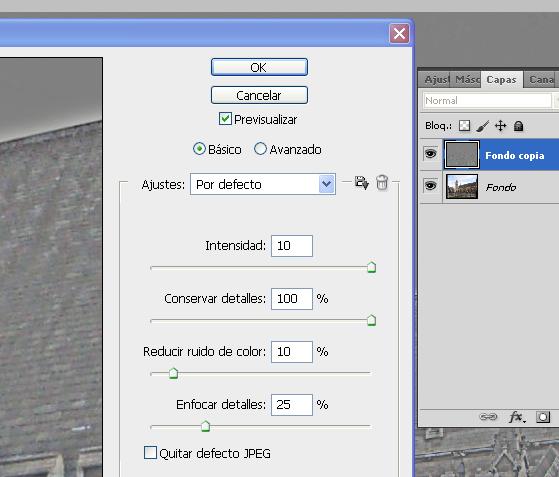
Filtro / Ruido / REDUCIR RUIDO |
|
|
| |
- Intensidad 10, Reducir ruido de color 10% |
|
|
|
|
 |
|
|
| 6 |
|
Repetir este paso si fuese Necesario |
|
|
| 7 | |
Modo fusion : SUPONER |
|
|
| 8 | |
Selecionar CAPA FONDO | |
|
| 9 |
|
Capa / DUPLICAR CAPA |
|
|
| 10 | |
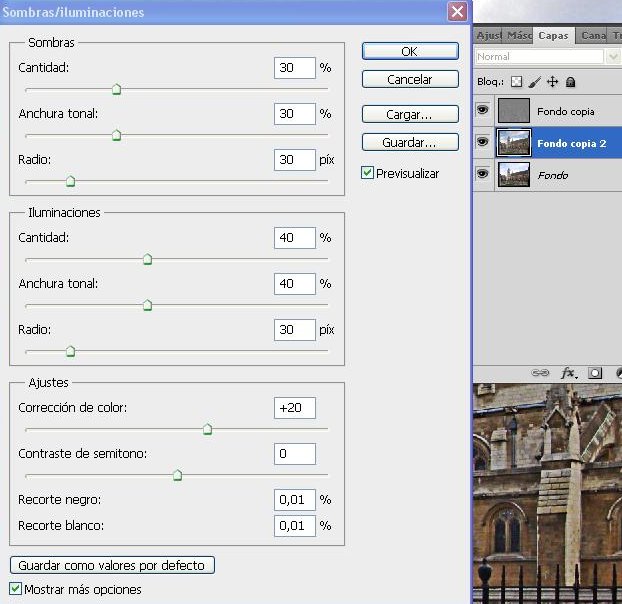
Imagen / Ajustes / SOMBRA | |
|
| | |
- Sombras - 30 / 30, Illuminaciones - 40 / 40 | |
|
| |
|
 |
|
|
| 11 |
|
Reducir un poco la OPACIDAD |
|
|
| 12 |
|
Seleccionar CAPA SUPERIOR |
|
|
| 13 |
|
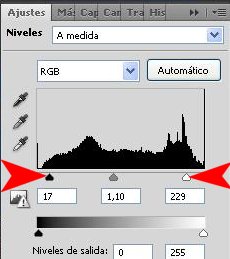
Capa / Nueve Capa de Ajustes / NIVELES |
|
|
| |
|
- Ajustar Luminosidad Y Contraste |
|
|
| |
|
|
|
|
| |
|
|
|
|
| | |
Fin | |
|
| |
|
|
|
|